Find your way around
Where everything lives
Now that your data is in, it helps to know the lay of the land. Allyos is designed to keep things clean and out of your way, so you will spend most of your time in just a few main areas.
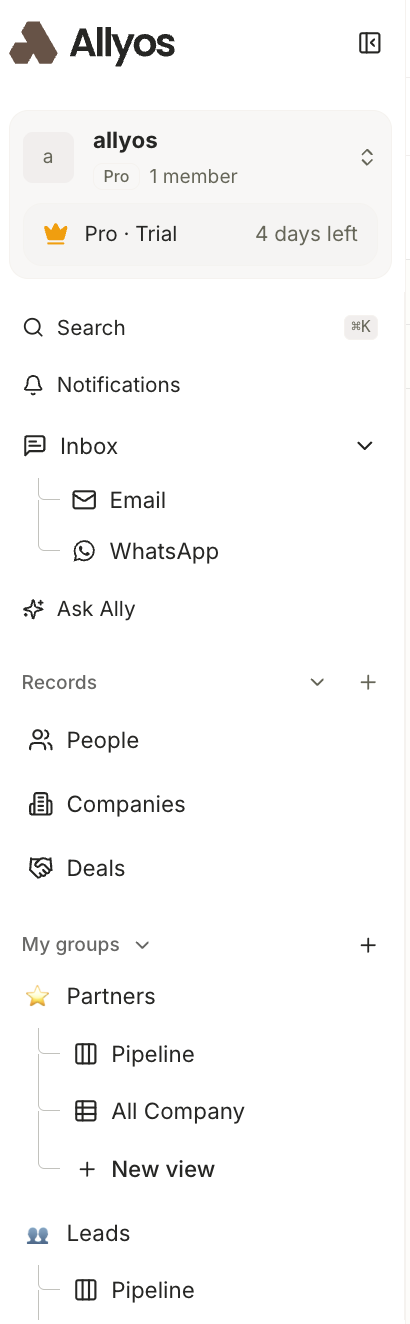
1Search
The absolute fastest way to jump to anything in your workspace. Hit ⌘K from anywhere, start typing a name or company, and go straight to their record.
2Notifications
Your in-app activity feed. Any updates, mentions, or changes that happen across your workspace show up here so nothing slips past you.
3Inbox
Your unified messaging hub for email and WhatsApp. You can send individual messages or run bulk campaigns to multiple people at once, using your Google account or a custom domain.
4Ask Ally
Your built-in AI assistant is always just a click away. Ask it to find a contact, summarize a conversation, draft a message, or handle a task, without leaving the page you are on.
5Records (People, Companies, Deals)
This is your complete directory. Every object in your workspace lives here. Click into any record to open its full history, emails, WhatsApp chats, notes, and team activity on a single screen.
6My Groups
This is where you actually do the work. Your Groups are your active workflows, like your sales pipelines, VIP client lists, or outreach segments. Each Group can have multiple views, such as a Kanban pipeline or a spreadsheet-style table.
Don't feel like you need to memorize a complex map. If you only remember two things, make it this: every piece of history lives on a record, and Groups are how you organize them.
Next: bring your team in.